Students - Find & Learn
Discover tutors, institutes & academies and learning opportunities that match your needs.
EduFocus
Find the right tutor, learn with AI, manage your learning journey, and run your institute - all in one platform.
Built for students, parents, tutors and institutes & academies.

What is EduFocus?
EduFocus is a connected education platform that brings students, parents, tutors and institutes & academies together. Whether you're looking for the right learning support, want to connect with students, or want to grow and manage your institute, EduFocus helps you discover, connect and manage it all in one place.
Discover tutors, institutes & academies and learning opportunities that match your needs.
Find suitable learning support and stay connected with your child's learning journey.
Build your professional profile, connect with students and manage your teaching activities.
Promote your programmes and manage students, tutors, batches and institute operations.
Find the Right Tutor
Discover tutors based on subject, class, location, learning mode, budget, experience and availability. Compare suitable profiles and connect with the right tutor for your learning needs.
One Platform. Different Needs.
Find learning support that fits your needs. Discover tutors and institutes & academies, explore learning options and connect with the right educational support.
Get discovered by the right students. Create your professional profile, showcase your teaching expertise and connect with students looking for your expertise.
Reach more students and grow your institute. Promote your courses, generate relevant enquiries and manage your students, tutors and academic activities efficiently.
Everything You Need
EduFocus brings learning, teaching and education management tools together to support students, parents, tutors and institutes & academies.
Explore tutor and institute & academy profiles and discover learning options based on your requirements.
Explore available online, offline and hybrid learning options.
Keep classes, homework, attendance and learning activities organised.
Help parents stay connected with their child's learning journey.
Manage your profile, students, sessions and teaching activities.
Manage students, tutors, batches and academic operations from one place.
Meet Your AI Tutor
Learning support whenever you need it. Stuck on a difficult concept? EduFocus AI Tutor helps you understand concepts, ask questions, practise and revise at your own pace.
Get concepts explained in a simple, step-by-step way.
Get help when you're stuck and explore follow-up questions.
Strengthen your understanding through practice and revision.
AI Tutor is a learning aid. Important answers should also be checked with your tutor or course material.
Explore AI Tutor
From finding the right tutor to staying on top of your learning journey, EduFocus helps students and parents stay connected with the right educational support.
Build your professional presence, connect with relevant students and manage your teaching journey from one platform.
Manage your institute's day-to-day operations from one platform. Keep students, tutors, batches, fees and communication organised while reducing manual work.
How EduFocus Works
Discover, compare, connect, then learn and manage your education activities through EduFocus.

Find tutors, institutes & academies and learning opportunities based on your requirements.

Review profiles, qualifications, teaching modes, rates, schedules, and published feedback.

Connect with the tutor or institute & academy that matches your learning needs.

Learn, teach and manage your education activities through the EduFocus platform.
Why EduFocus
Students, parents, tutors and institutes & academies can connect on one platform.
Find learning and teaching opportunities based on your needs.
Explore online, offline and hybrid learning opportunities.
Access tools designed for students, parents, tutors and institutes & academies.
Get smarter learning support with EduFocus AI Tutor.
Help learners learn better, tutors reach students and institutes & academies grow their presence.
EduFocus App Coming Soon
Your EduFocus experience is coming to mobile. Stay connected with your learning, teaching and education journey wherever you go. Store links become active when the respective app is released.
 Coming soon onApp Store
 Coming soon onGoogle PlayComing soon onApp StoreComing soon onGoogle Play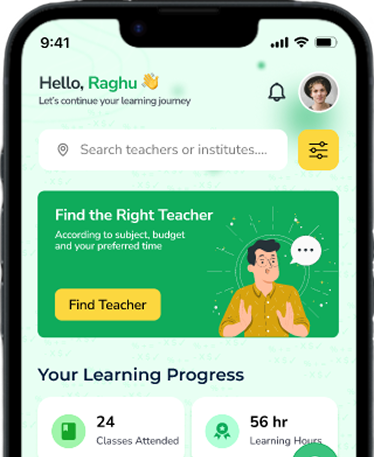
We're here to help
Whether you're looking for a tutor, interested in joining as a tutor, want to partner with EduFocus as an institute or academy, or simply want to know more about the platform, get in touch with us.
Ask about student or guardian access, tutor onboarding, academy partnerships, learning features, or payments.
Email Support
support@edufocus.in
Learning Support
Students and guardians
Partner Support
Tutors and academies
Students Support
Teachers Support
Institute Partnership
Payment Assistance
Find answers to common questions about Edufocus, classes, payments, teachers, and parent access.
EduFocus is a connected education platform that brings students, parents, tutors and institutes & academies together for discovery, learning and education management.
Refer & Earn
Know someone looking for the right tutor, institute or academy, or learning support? Invite them to EduFocus and earn rewards when they join. you receive 50 Edufocus Points—simple rewards for helping someone begin a better learning journey.
1 Point = ₹1
Clear, easy-to-understand value
Share EduFocus
They Join EduFocus
Earn Points
Redeem Your Rewards
Rewards apply to eligible, successfully completed referrals and may be subject to referral program terms.

Whether you're looking for the right learning support, want to connect with students or want to grow your institute or academy, EduFocus brings the right people, tools and opportunities together in one place.