
Build Your Tutor Profile. Connect With the Right Students.
Create your professional tutor profile, showcase your teaching expertise, set your subjects, fees and availability, and connect with students looking for the right learning support. EduFocus helps you build your teaching presence and manage your tutoring activities in one place.

Verified
Student Inquiries
Flexible
Teaching Modes
Direct
Student Connections
Easy
Schedules & Fees


Why Tutors Choose EduFocus

Build Your Professional Presence
Create a detailed tutor profile with your qualifications, experience, subjects, specialisations, teaching modes and availability.

Get Discovered by Students
Make your teaching profile easier for students and parents to discover when they are looking for relevant tutoring support.

Choose How You Teach
Offer online, offline or hybrid learning based on your teaching setup and preferences.

Manage Students & Batches
Organise your students, batches, sessions, attendance and learning activities from your tutor workspace.

Keep Fees Organised
Keep relevant fee, payment and installment information organised as part of your tutoring workflow.

Track Your Teaching Activity
Review available information about enquiries, students, payments and teaching activity based on the tools available in your account.
Manage Your Tutoring in One Place

Teach Online, Offline or Hybrid
Choose the teaching mode that works best for you, including home tuition, online classes, and hybrid batches.

Connect Directly With Students
Receive verified student tuition inquiries and connect with learners looking for tutors in your subject and preferred location or mode.

Manage Your Teaching Easily
Use built-in tools to manage schedules, students, attendance, batches, and fee tracking from one convenient platform.

Track Fees & Student Activity
Keep teaching operations organised with fees, attendance, lesson plans, and clear progress updates.
Get Started as a Tutor in 4 Simple Steps

Create Your Profile
Register and add your experience, qualifications, subjects, and teaching preferences.

Complete Onboarding
Submit the requested documents and complete each profile review step.

Set Up Your Teaching
Add class levels, teaching modes, subject rates, availability, and batches.

Manage Your Workflow
Follow leads, schedule sessions, track attendance, review homework, and monitor fees.
Meet Your AI Tutor
Meet Your AI Tutor
Learning support whenever you need it. Stuck on a difficult concept? EduFocus AI Tutor helps you understand concepts, ask questions, practise and revise at your own pace.
Understand Better
Get concepts explained in a simple, step-by-step way.
Ask Your Questions
Get help when you're stuck and explore follow-up questions.
Practise & Revise
Strengthen your understanding through practice and revision.
AI Tutor is a learning aid. Important answers should also be checked with your tutor or course material.
Explore AI Tutor
EduFocus App Coming Soon
The EduFocus Tutor App Is Coming Soon
Your tutoring workspace is coming to mobile. Stay connected with your students, batches, schedules, attendance, homework and fee information wherever you teach. Store links become active when the respective app is released.
 Coming soon onApp Store
 Coming soon onGoogle Play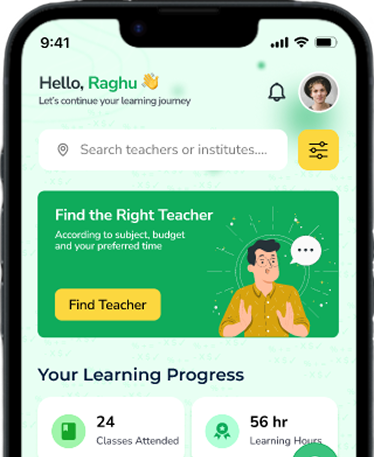
Frequently Asked Questions
Yes. Batches and sessions can be organised as online, offline or hybrid, depending on what the tutor or academy publishes. Learners should confirm the mode and location shown for the selected batch or session.
Teach With A Clearer Workflow
Your Tutor Workspace
Keep enquiries, students, schedules, attendance, homework, feedback, and payment summaries in one operational view.
We're here to help
Have Questions About Joining EduFocus?Edufocus
Whether you want to create a tutor profile, understand how student connections work or learn more about the tutor workspace, get in touch with us.
Get In Touch
Ask about student or guardian access, tutor onboarding, academy partnerships, learning features, or payments.
Email Support
support@edufocus.in
Learning Support
Students and guardians
Partner Support
Tutors and academies

Students Support
Teachers Support
Institute Partnership
Payment Assistance
Send Us A Message
Ready to Grow Your Teaching With EduFocus?
Build your professional tutor profile, connect with students looking for your expertise and manage your teaching activities from one connected platform.